Active pentest
Open a running pentest from Assets (or Home) by selecting the app and its latest run. A normal pentest takes around 24 hours. Small targets can finish faster, large ones can take longer.
Phases
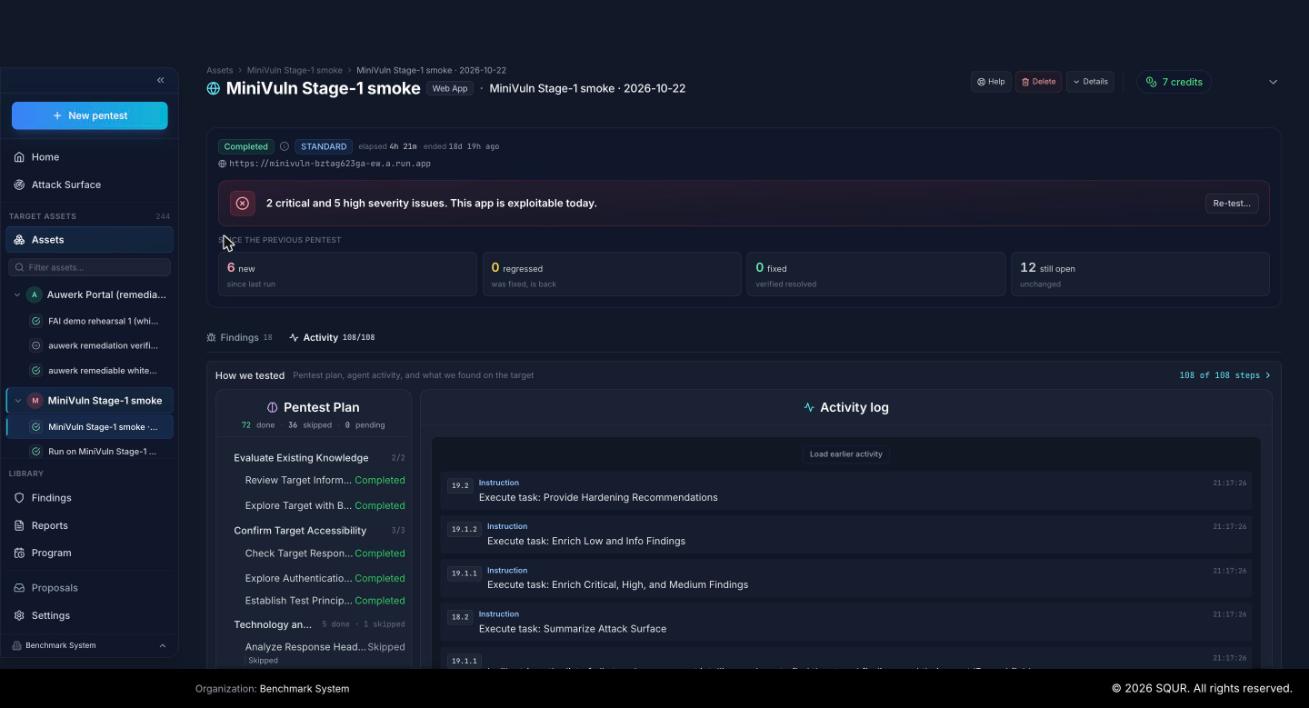
The run page shows where the pentest is:
- Infra provisioning: SQUR sets up dedicated, isolated infrastructure for your pentest.
- Checking known findings: if the app has been tested before, SQUR first re-tests the findings still open from the last pentest.
- Attack plan synthesis: SQUR builds an attack plan from your scope and context before any traffic reaches your app.
- Recon, attack and verify: the agents work through the plan: reconnaissance, vulnerability analysis, exploitation and verification.
- Report ready: you get a "pentest complete" email. Reports and findings are ready.
- On-demand re-verification: after you fix something, retest findings with one click.
What you see while it runs
- Status and timing: a status badge, time elapsed, and the current phase ("Currently: ...").
- Now and next: what the agent is doing and the next planned task.
- Activity feed: live messages as the agent works.
- Findings as they appear: each finding shows up once the agent has confirmed it, with evidence. Select one to read what was found, the proof captured and how to fix it. Use
jandkto move through the list. - Coverage and test plan: what has been tested so far and how it was tested.
"No findings yet" early in a run does not mean the app is clean. The search for new issues may not have started yet.
When the agent needs you
If the agent needs a human input to continue , the run shows Human input required and a prompt for it.
Final verdict
When the run completes, the verdict band summarizes the result. If a run was stopped or failed, the page says the results are incomplete and lists what was found before the stop.