Run an attack surface scan
You can scan from the public site or from the app. The scan is the same; the app adds history, the full check set and the handoff to a pentest.
From asm.squr.ai (no account)
- Open asm.squr.ai.
- Enter your website address.
- Tick I confirm I own or have authorization to scan this domain.
- Click Scan now.
A progress view shows the checks running. Most scans finish in under a minute. Larger domains with many subdomains take longer.
From the SQUR app
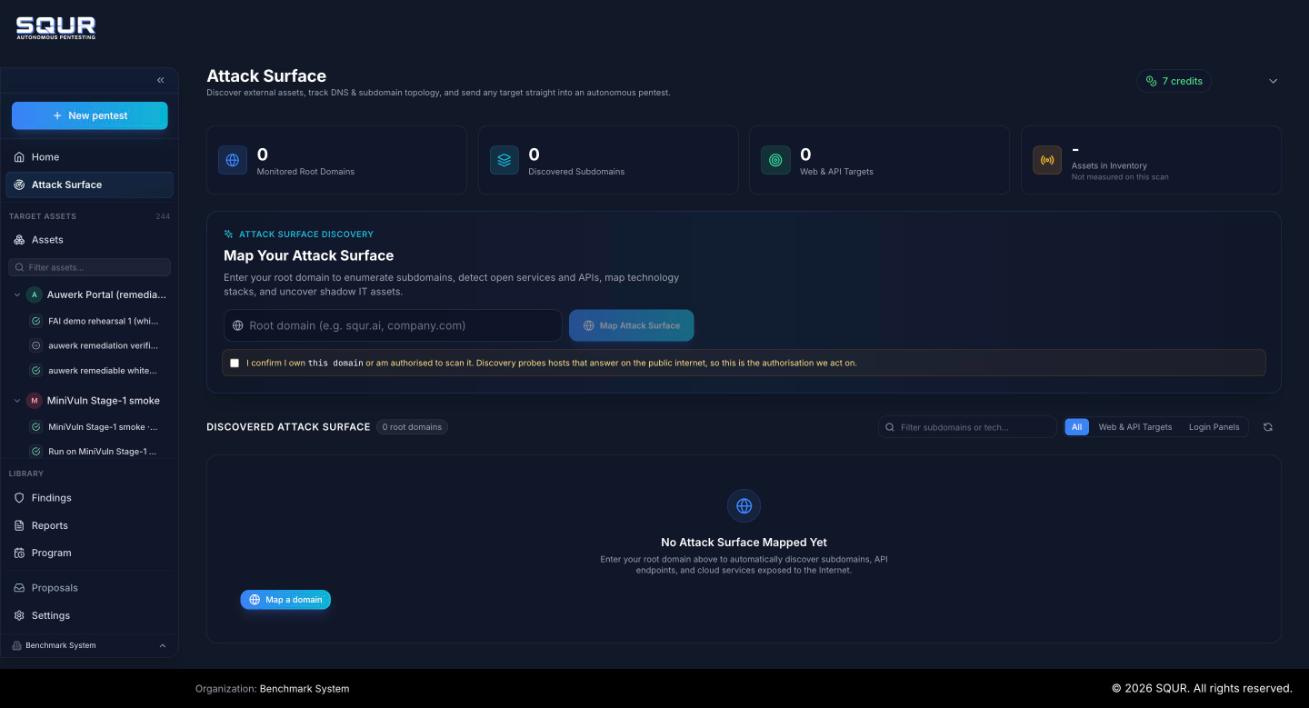
- In the sidebar, open Attack Surface.
- Enter your root domain (for example
example.com, not a deep URL). - Tick the authorization confirmation. It reads: you own the domain or are authorized to scan it, because discovery probes hosts that answer on the public internet.
- Click Map Attack Surface.
The page fills with your discovered attack surface. The top row counts monitored root domains, discovered subdomains, web and API targets, and assets in inventory.
Scan the root domain
One scan covers the domain and its subdomains. You do not add subdomains one by one.
Prove ownership (optional, recommended)
For a signed-in scan, verify the domain so the full set of active checks runs:
- Open the scan for the domain and choose Verify domain ownership.
- Add the TXT record SQUR shows you to your DNS.
- Wait for DNS propagation (a few minutes) and let SQUR check.
Verification records proof of ownership. It does not make the scan send attacks.
Scans repeat
With an account, your scopes are re-checked weekly. New subdomains and changed exposure show up on the next re-check, so the map stays current between pentests.
Troubleshooting
| Symptom | Likely cause |
|---|---|
| The button does nothing | The authorization box is not ticked. |
| Few or no assets | The domain has little public footprint, or a protective service blocked probing. Some checks are skipped on protected hosts on purpose, to avoid blocking you. |
| Rate limit message | Too many scans in a short time from one network. Wait a minute and retry. |
| Infrastructure hosts not scanned | Name servers and mail relays are shown on the map but not probed. They create noise and are not your application. |
Next: Read the results.